Loupine — private prompt & skill library
Your company's proven AI know-how — for everyone, everywhere.
Not another app — an extension of the AI your team already uses. Your company's library shows up in every conversation: governed, auditable, written by the people who actually do the work.
Free 30-day pilot · No install — uses your SSO · Works in ChatGPT & Claude
Write the follow-up for the Meridian demo using our playbook.
Works inside the tools your team already uses
- ChatGPT
- Claude
What works with AI dies in the chat of whoever discovered it
Every week someone on your team nails a prompt. And every week it gets lost.
Everyone asks their own way
The same task comes out different depending on who asks. The best way to ask exists — but only in one person's chat history.
The same prompt gets rediscovered every week
Without a shared place, everyone pays the discovery cost again. The time AI saves, rework takes back.
When someone leaves, the know-how leaves too
What the team learned lives in personal chat histories. Until that changes, it isn't a company asset — it belongs to whoever typed it.
See it in 30 seconds
How it works
Three steps turn a good conversation into a governed company asset — without leaving the chat.
- 1
Paste one link
Add the connector to your company's claude.ai or ChatGPT. No install — access uses the corporate login (SSO) your team already has.
loupine.app/mcpMCP - 2
Your library appears in the conversation
Approved prompts and skills, organized by team, always up to date — inside the tool each person already uses.
Post-demo follow-uptodayRenewal risk checkyesterday - 3
Save what worked
Got a good result? "Save this for my team" turns the conversation into a governed library asset without leaving the chat.
Save this for my teamsaved now
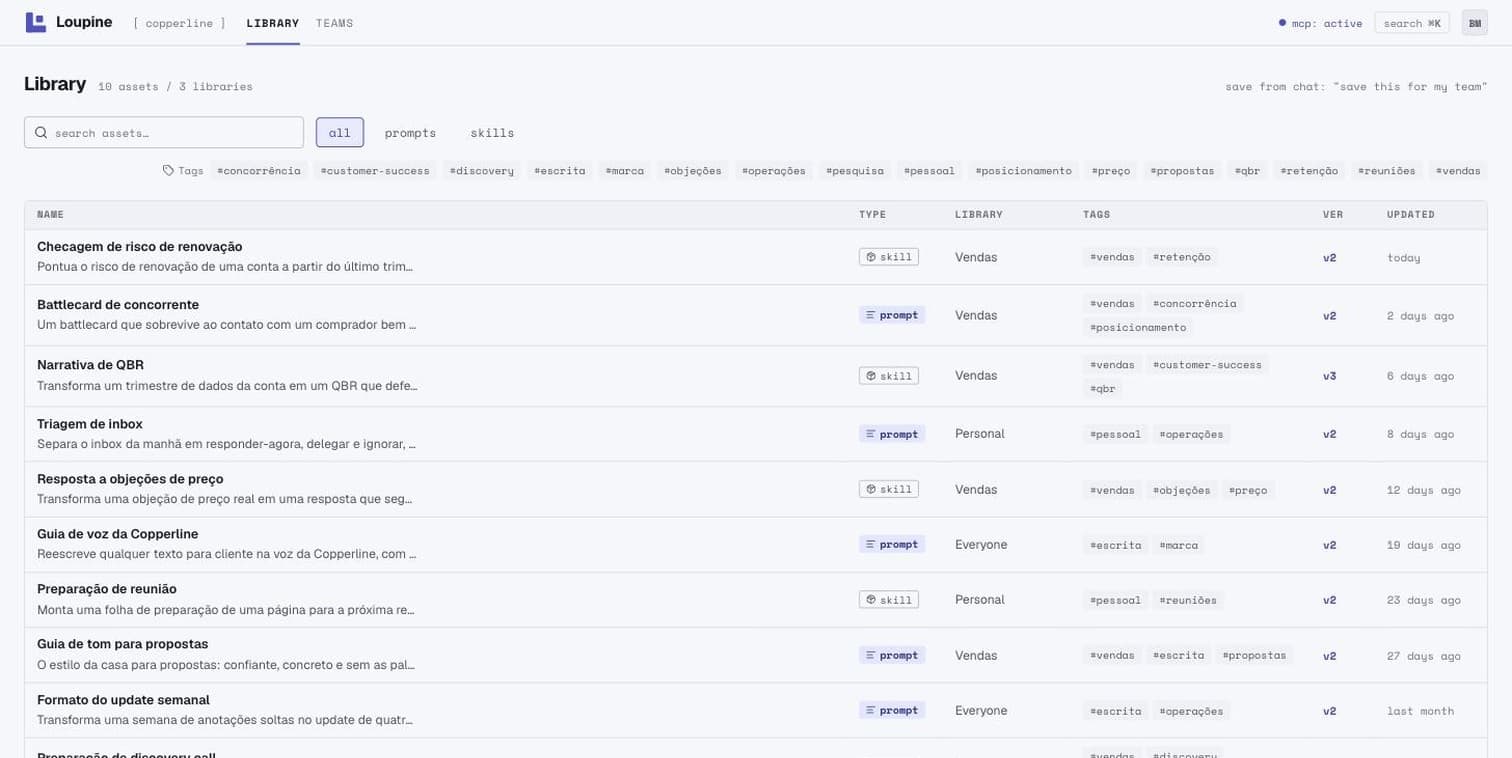
The library behind every chat
Every skill your AI uses lives here: approved, tagged, organized per team. Real screenshot of the product.
Why now
The right skill shows up on its own
Ask the way you always ask. The assistant finds your team's approved skill for the task in the library and works with it — nobody has to remember it exists.
Library — Sales
QBR narrativein usePricing objectionsPost-demo follow-upWritten where the work happens
Got a good result in the chat? One ask and the conversation becomes a team asset — named and tagged in the library, not authored in a portal nobody opens.
Library — Sales
One library, every tool
ChatGPT and Claude served from a single connector, with per-team access control. If the company switches tools tomorrow, the library comes along.
LoupineMCP
loupine.app/mcp
“Governed” isn’t a promise. It’s the architecture.
What “governed and auditable” means in practice.
approval
Approved by whoever answers for the team
Nothing becomes the standard without review: team leads approve what enters the team library. Personal drafts stay separate from what's official.
history
Every asset has a history
Author, previous versions, and who saved each one. “Who wrote this, when, and what changed” always has an answer — for any prompt the team uses.
freshness
One source, always current
The library lives in one place and is served to every tool. Update it, and the next conversation already uses the new version — no stale copies in circulation.
access
Access per team, through your SSO
Each person sees what their role and teams allow, with the corporate login they already have. Leave the company, lose the access — the library stays.
Common questions
How does my team get access?
Through the corporate login (SSO) your company already uses. You paste one connector link into ChatGPT or claude.ai — there is nothing to install on anyone's machine.
Which AI tools does it work with?
ChatGPT and Claude today, through one connector. The library lives in one place and is served to every tool — same assets, always up to date.
What does the pilot cost?
Nothing. The 30-day pilot is free, with no credit card. We seed the library together with your team so it's useful from day one.
What happens after the pilot?
You decide. If Loupine is working for your team, we define the plan together — design partners get founding conditions. The library your team wrote stays yours.
Who writes the prompts and skills?
Your team — from conversations that actually worked, saved in one click. Team leads review and approve, so the library stays trustworthy.
Where does our data live? Who can see the library?
The library is private to your organization: every request goes through your corporate SSO and is scoped, on the server, to the caller's teams. We don't train models on your content, and the connector can't read your conversations — it only answers the tool calls the assistant makes. Under LGPD we act as a processor: the content is your company's, and at the end of the engagement we delete or return everything within 30 days. Details are in the Privacy Policy.
Free 30-day pilot
We are selecting design-partner companies. The pilot is free and the library is seeded together with your team. In 30 days you know whether it works — and what your team writes stays yours.
- Your library seeded with us, in a working session
- A direct line to the founder during the pilot
- Your workflows shape the roadmap
Free · 30 days · No credit card · Reply within one business day